5. Anatomy of the ΔStop
This section is a tour of the faceplate. Every control on the ΔStop has one job, and once you know what each one does, the workflow in the following sections will feel obvious. If you're already familiar with the basics from the Quick Start, use this section as a reference.
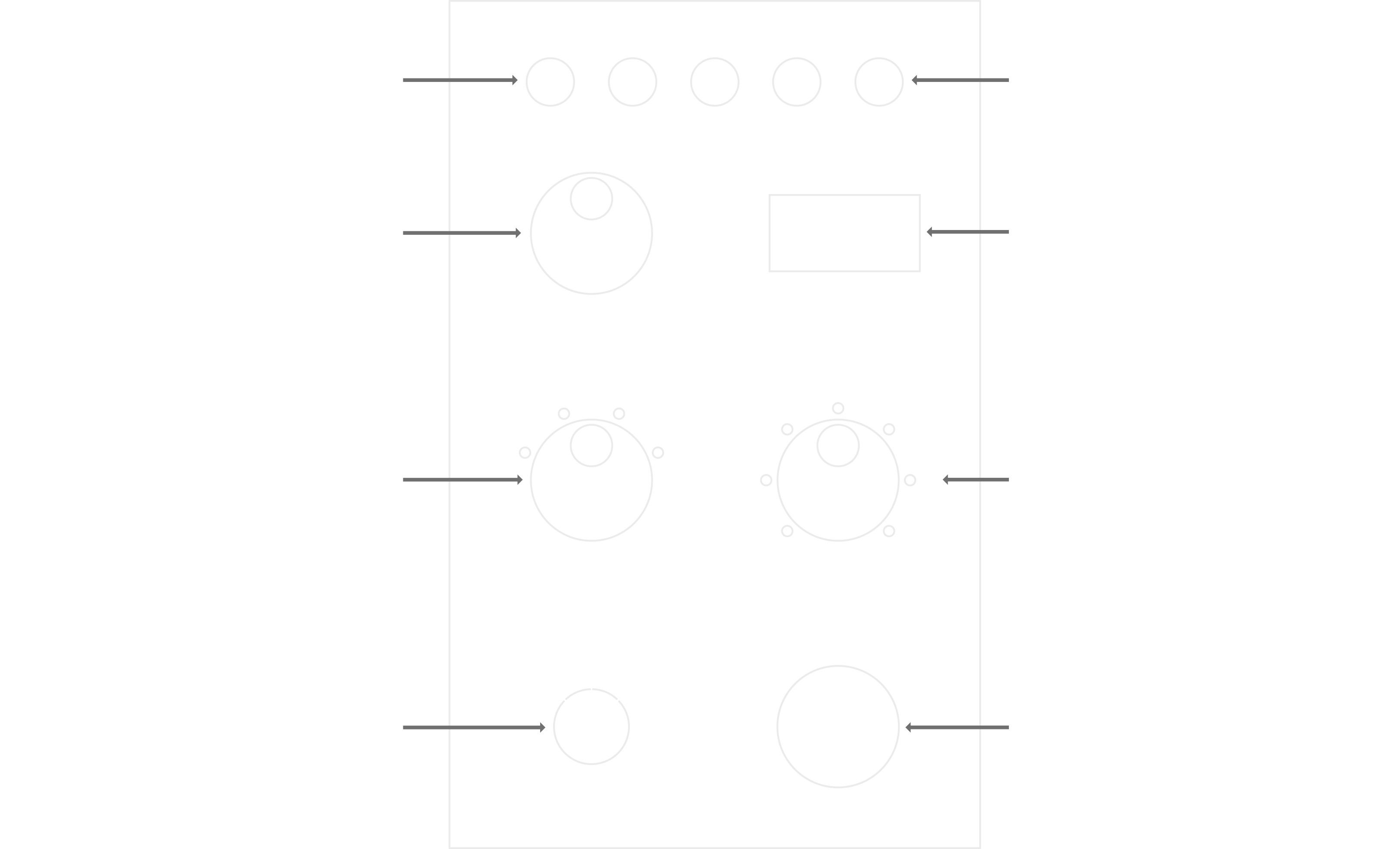
Time Display
The primary display sits in the upper right of the faceplate. It shows the currently set time when you are configuring an exposure, and the time remaining when an exposure is running. The display updates in tenths of a second during a running exposure so you can follow along visually if you choose to.
Reset Button
The leftmost button on the top row. Pressing Reset cancels any timer currently in progress and returns the unit to its initial state for the current mode. If you realize mid-exposure that you've misaligned your paper or made a wrong selection, Reset is the fastest way to start over. It does not clear stored Program Memory banks.
Program Memory
The group of four buttons along the top of the faceplate, labeled Set, 1, 2, and 3.
The three numbered buttons are memory banks. Each bank can store a complete timing configuration: base time, test interval, and print stop selection. To recall a stored configuration, press its numbered button. To store the current configuration to a bank, press Set, then press the numbered button where you want the configuration saved.
Program Memory is most useful during a printing session where you are working between several variants of the same print, or across a small set of negatives where you've already dialed in your times. It lets you switch between them without redialing the controls each time.
Base Time Dial
The large dial on the left side of the faceplate. Base Time sets the exposure in seconds, adjustable in tenth-of-a-second increments. This is the foundation from which every test strip and final print is calculated.
Turn the dial to increase or decrease the base time. The display updates as you turn. Most printing sessions will use a base time somewhere between 10 and 60 seconds depending on negative density, paper, and aperture.
Test Interval Dial
The left dial in the lower row. Test Interval sets the fractional f-stop step used when the ΔStop is in Test mode. The available positions are 1/8, 1/4, 1/3, and 1/2 stop.
A larger interval (1/2) covers a wider exposure range in a single strip and is ideal for a first test on an unfamiliar negative. A smaller interval (1/8 or 1/4) covers a narrower range with finer precision and is ideal for refining around a known-good starting point. Section 8 covers the practical use of each interval in more detail.
Print Stop Select Dial
The right dial in the lower row. Print Stop Select determines how the final print exposure relates to the base time, measured in familiar plus-or-minus stop markings from -3 to +3.
After you've made a test strip and chosen your preferred step, Print Stop Select is how you tell the ΔStop which exposure to use for the final print. At 0, the print exposure equals the base time. At +1, it is one full stop longer. At -1, it is one full stop shorter. The dial provides whole-stop markings because those are the familiar reference points; the ΔStop handles the math internally when you set a base time that reflects a fractional-stop winner from your test strip.
Mode Selector
The smaller dial at the bottom left of the faceplate, with three positions: Focus, Test, and Print.
Focus mode turns the enlarger lamp on continuously while the dial is in the Focus position. Use this to compose and focus your image on the easel. No button press is required; the lamp follows the dial.
Test mode prepares the ΔStop to run a test strip exposure based on the current Base Time and Test Interval settings. Press Start to begin the exposure sequence.
Print mode prepares the ΔStop to run a final print exposure based on the current Base Time and Print Stop Select settings. Press Start to begin the exposure.
Start/Stop Button
The large button at the bottom right of the faceplate. Press Start to begin a timed exposure in Test or Print mode. Press it again during a running exposure to stop the timer immediately. The enlarger lamp turns off when the exposure completes or when Stop is pressed, whichever comes first.
The Start/Stop button is deliberately the largest control on the faceplate. In the dark, with your attention on the easel, you should be able to find it without looking.
Rear Panel
The back of the ΔStop has the following connections:
- Enlarger This jack is the signal to the relay unit to turn on the enlarger
- Footswitch This jack is to accept an optional footswitch to use as a Start/Stop button
- Power This jack accepts a 5mm barrel plug for the 5v power required to operate the unit
Relay Unit
Two normally-off outlets, which turn on when the ΔStop signals the relay to activate during Focus mode or a timed exposure. Your enlarger should be plugged into a normally-off outlet.
One normally-on outlet, which delivers power continuously but cuts off when the relay activates. This is intended for accessories that should be on when the enlarger is off, such as a safelight.
One always-on outlet, which delivers power continuously regardless of the relay state. This is intended for accessories that should remain powered at all times.
The outlets are clearly labeled on the panel. Plugging equipment into the wrong outlet type is the most common setup error; Section 6 covers correct connections in detail.